


No products in the cart.
Zone: Black Ops 7
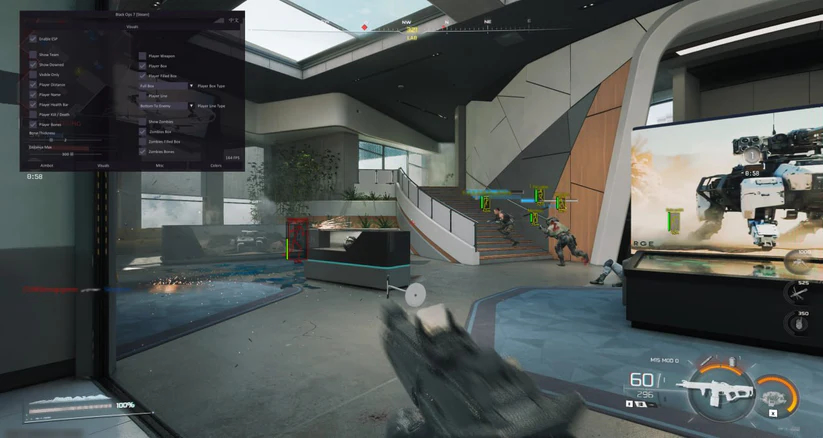
Customizable hotkey
Bone selection
Nearest bone
Focus team
Focus downed
Draw FOV
Customizable FOV
Dynamic FOV
Customizable smoothing
Humanized trajectories
Aim prediction
Check visibility
No recoil
Maximum distance
Player ESP
Filled ESP Box
Show team
Show downed
Bones skeleton
Check visibility
Player box
Snapline
Distance
Health
Shield
Weapon
Name
Visible only
Maximum distance
Zombies ESP
AI/Bot ESP
Vehicle ESP
2D radar
Item ESP
Item type filter
Crate ESP
Weapon ESP
Ammo ESP
Crosshair
Customizable size
Instant delivery
Auto update (no re-download)
Fully streamproof
Screenshots protection
Disableable watermark
Customizable colors
SYSTEM SPECS
OS
Windows 10 - Windows 11 (All Builds)
CPU
Intel & AMD
GPU
Nvidia & AMD
SELECT PLAN
DOCUMENTATION

5
Based on 2 reviews
C
Been using Zhexcheats on BO7 for around 30 months now, so this is a straight honest take.
First time setup confused me a bit, not gonna lie. Took a minute to understand everything, but their support jumped in fast and walked me through it. After that, it was smooth sailing.
Menu is clean and easy once you get used to it. No bloated stuff, everything is where it should be. Aimbot feels natural, especially for legit play. You can keep it soft and lowkey or tweak it if you wanna play more aggressive.
ESP stays clear even in fast fights. You can actually see what’s going on without your screen turning into a mess. Makes positioning and tracking way easier.
Performance is solid. No FPS drops, no stutters, even in intense matches. Runs quietly in the background.
Biggest plus for me is stability. Almost 2.5 years in, no bans, no random crashes, and updates always come quick after BO7 patches.
Overall, Zhexcheats does what it’s supposed to do. Took a little getting used to at the start, but once you’re set, it’s reliable, smooth, and comfortable to play with.
If you’re on BO7 and want something legit-friendly but still powerful when needed, this is a solid choice.
J
smooth performance with a clean and easy-to-use menu. The aimbot feels responsive without being overcomplicated, while the ESP stays clear and readable during fast gameplay. No noticeable FPS drops, even in intense matches.
Perfect for legit play with adjustable settings, but also strong enough if you want to push harder. Overall, a solid and reliable choice for BO7 players who want an edge without sacrificing comfort.
About Zone: Black Ops 7
Zone: Black Ops 7 is an external cheat for Black Ops 7 and one of our best sellers. Zone is known for its dead-simple USB setup. Plug in your flash drive, run the loader, and play. The brand gets consistent updates and has long undetected runs across multiple games.
Black Ops 7 is the latest CoD with multiplayer and zombies, protected by RICOCHET. Zone BO7 bypasses it cleanly. ESP and aimbot cover all modes from 6v6 to ground war to zombie rounds.
Getting Started
- Download the loader and copy it to a USB flash drive.
- Install Visual C++ Redistributables if you do not have them.
- Uninstall any third-party antivirus and turn off Windows Defender real-time protection.
- Close all game launchers and overlays (Discord, GeForce Experience, MSI Afterburner).
- Run the loader from your USB drive as administrator and enter your license key.
- Click Start, wait for the success message, then remove the USB.
- Launch Black Ops 7 in borderless or windowed mode.
In-Game Controls
The menu shows up automatically when the game loads. Navigate with your mouse. Settings save between sessions. Set your game to borderless or windowed. Fullscreen exclusive mode blocks the overlay.
Safety
Zone: Black Ops 7 has built-in HWID protection against RICOCHET bans. The USB loading method adds extra safety because no cheat files sit on your main drive. Always run the loader before opening any game client.
Need Help?
Our setup guide has step-by-step instructions with screenshots. For live help, join Discord.
Write a Review
You must be logged in to post a review.