


No products in the cart.
Desync: PUBG

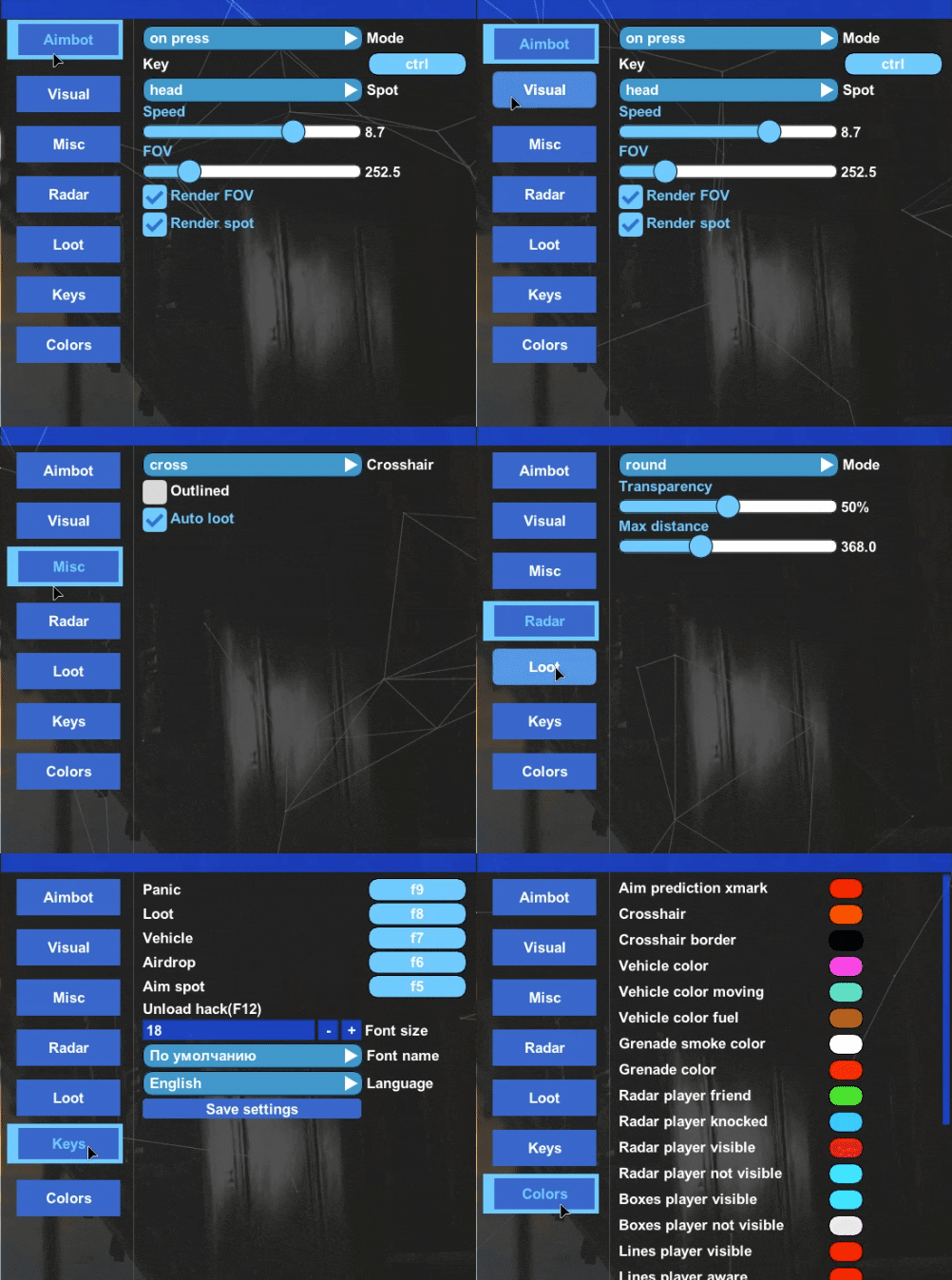
Mode
Key 1/2
Spot / L2
Switch bone key
Auto target switch
Aim speed
FOV
Show FOV
Show Spot
Show current bone
Aim at Knocked
Recoil compensation
Box
Outlined
Blackout
Line
Health
Grenades
Weapon
Skeletal
Name
Kills
Distance
Loot mode
Loot distance
Package mode
Vehicle
Vehicle distance
Grenades
Show gasoline
Show smoke gun
Show smoke grenade
Show flash-bang grenade
Show molotov cocktail
Show blue-zone grenade
Show BR-coins
Show bullet traces
Crosshair
Auto loot
Auto loot on key
Mode
Transparency
Max distance
Players’ perspective
Gaze indicator
Panic key
Loot key
Vehicle wheels display
Air drop
Aim pick
Unload key
Font size
Font name
Reset config
Save config
SYSTEM SPECS
OS
Windows 10 - Windows 11 (All Builds)
CPU
Intel & AMD
GPU
AMD & Nvidia
SELECT PLAN
DOCUMENTATION

5
Based on 92 reviews
T
Been using the this cheat and i haven’t even been banned for over 1 week
.
Desync for PUBG hits hard. The ESP is clean, the aimbot feels smooth, and the performance stays stable even in sweaty lobbies. If you want a simple setup with real competitive power, Desync is easily one of the strongest picks on Zhexcheats right now.
B
Desync PUBG is absolutely flawless. I’ve been using it for weeks now, and it’s easily the most stable cheat I’ve tried. Zero FPS drops, no detection, and everything feels smooth and well-optimized. The UI looks clean, the setup took less than two minutes, and the support team replies almost instantly. If you’re serious about dominating PUBG safely, this is the one.
D
A really good service and the cheats are world class so far no problems I can only recommend
Write a Review
You must be logged in to post a review.
About Desync: PUBG
Desync: PUBG is a top-tier external cheat for PUBG with performance close to internal solutions. Clean UI, easy injection, and it stays undetected. It runs smooth and responsive even though it is external, and that is why it is our top seller.
PUBG drops 100 players on a massive map where the first person to spot the enemy usually wins. Desync PUBG highlights every player through terrain and buildings so you can plan rotations safely. The long-range aimbot helps you win sniper duels that would otherwise come down to pure luck.
Getting Started
- Download and extract the loader to a dedicated folder (not on your desktop).
- Install RuntimePack, DirectX, and Visual C++ Redistributables.
- Turn off real-time protection and any third-party antivirus.
- Run the loader as administrator and enter your license key.
- Select your game and click Launch Cheat. Your PC will restart on first use.
- After the restart, launch your game normally.
- Press F2 in the lobby to inject. Press Home or Insert to open the menu.
In-Game Controls
Use F2 to inject while in the lobby. Once in the game, press Home or Insert to toggle the menu. You can change all settings without restarting. Your game needs to run in borderless or windowed mode for the overlay to work.
Safety
Desync: PUBG has a built-in HWID spoofer to protect your hardware identity from PUBG Shield bans. Turn on the spoofer before you launch the game. The cheat also cleans traces automatically after each session.
Need Help?
Full setup instructions and troubleshooting are in our installation guide. You can also get help on Discord.
I’ve been using the aimbot and ESP for about 6 months now. Both features work reliably and are very easy to configure, even for first-time users. Performance has been consistent, and the settings are straightforward to adjust to personal preference. Overall, it delivers solid functionality for the price and does what it claims.