


No products in the cart.
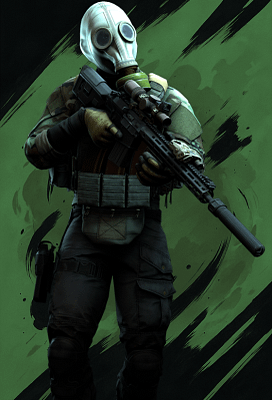
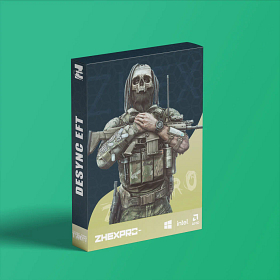
Desync: Escape From Tarkov


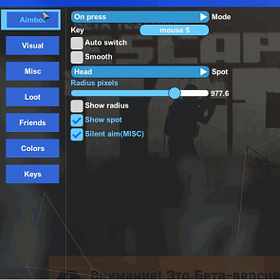
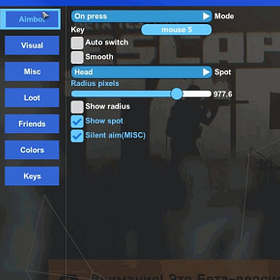
Mode
Key
Auto switch
Smoothness
Silent AIM
Add friend
Remove friend
Switch aim spot
Crosshair
No recoil
FOV
Spot
Show FOV
Show Spot
Aim bone
Nearest bone
Visuals
Box
Bone
Name
Exits
Grenades
Player price
Level
Weapon
Mines
Enemy armor
Enemy ammo
Head outline
Kills
Distance
Snapline
Max distance
Boss indicator
Players on map
Faction
Bot name
Border
Radar
My Ammo
No breath
No sway
No visor
Infinity stamina
Thermal visor
Loot through walls
Chams
Quest items
Quest marks
Quest info
Always daytime
Skip examining
Fast search
Fire near obstacle
No clouds
Colors
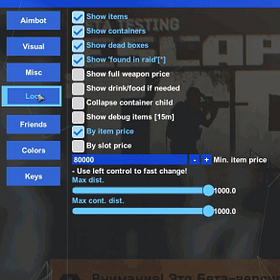
Show items
Show loot in dead boxes
Found in raid
Weapon price
Drink/food
Container child
Deadbox child
Debug items
Sort by price
Sort by slot
Min. item price
Item distance
Container distance
Custom filter
Show all keys
Show all medicine
Best loot
Mode
Transparency
Max distance
Perspective
Gaze indicator
Panic key
Loot key
Thermal key
Unload key
Font size
Font name
Language
Save config
SYSTEM SPECS
OS
Windows 10 - Windows 11 (All Builds)
CPU
Intel & AMD
GPU
AMD & Nvidia
SELECT PLAN
DOCUMENTATION
4.9
Based on 208 reviews
C
Used this got accused, never banned. Ton of rollbacks because of other people. I think its safe to say this shit good.
0
had been using another provider for a long time and they were clearly falling behind. From the first weeks, it was obvious that this was on a completely different level in terms of development speed and communication.
After seeing how active the Zhex dev team is, especially around major EFT updates, upgrading was an easy decision for me. Every Tarkov patch so far has been handled fast and clean. Updates roll out quickly, safety is always the top priority, and you are never left guessing what is going on. The devs actually talk to the community, listen to feedback, and openly discuss features instead of silently ignoring suggestions.
Feature wise, Zhex hits the perfect balance for me. Everything I need is there without unnecessary clutter. Performance impact is minimal, stability is solid, and it just works. I actively rotate between multiple accounts and progression has been smooth without issues. Reliability is honestly one of the strongest points here.
What really stands out is the mindset behind the product. There is a clear focus on bypass quality and long term safety rather than flashy menus or gimmicks. And that is exactly how it should be.
At this point, Zhex has proven itself as a serious, well maintained, and trustworthy option for EFT. Consistent updates, strong communication, and a product that delivers what it promises.
Zhex all the way 👊
I
It has the best UI I’ve ever seen.
I’ve been using it for a month now, and I highly recommend it.
Write a Review
You must be logged in to post a review.
About Desync: Escape From Tarkov
Desync: Escape From Tarkov is a top-tier external cheat for Escape from Tarkov with performance close to internal solutions. Clean UI, easy injection, and it stays undetected. It runs smooth and responsive even though it is external, and that is why it is our top seller.
In Escape from Tarkov, every raid is high stakes. Losing your kit to a camper you never saw is painful. Desync EFT gives you full player and loot ESP so you always know who is hiding around the next corner and where the valuable spawns are. The aimbot is fast enough for close-quarter fights in dorms, resort, and labs.
Getting Started
- Download and extract the loader to a dedicated folder (not on your desktop).
- Install RuntimePack, DirectX, and Visual C++ Redistributables.
- Turn off real-time protection and any third-party antivirus.
- Run the loader as administrator and enter your license key.
- Select your game and click Launch Cheat. Your PC will restart on first use.
- After the restart, launch your game normally.
- Press F2 in the lobby to inject. Press Home or Insert to open the menu.
In-Game Controls
Use F2 to inject while in the lobby. Once in the game, press Home or Insert to toggle the menu. You can change all settings without restarting. Your game needs to run in borderless or windowed mode for the overlay to work.
Safety
Desync: Escape From Tarkov has a built-in HWID spoofer to protect your hardware identity from BattlEye bans. Turn on the spoofer before you launch the game. The cheat also cleans traces automatically after each session.
Need Help?
Full setup instructions and troubleshooting are in our installation guide. You can also get help on Discord.
The features are generally easy to use and good.